Custom Report: Food Technicians Ingredient Distribution List with Class Information (Term Week)
Note: to access and run custom reports within My Recipe Manager requires the 'Custom Reports' (role) to be assigned to the users account by a school administrator. To view the list of available roles and what they allow a user to do click here.
Hint: to reset the custom report back to its default setting first select the 'Reset' button then select the 'Submit' button.
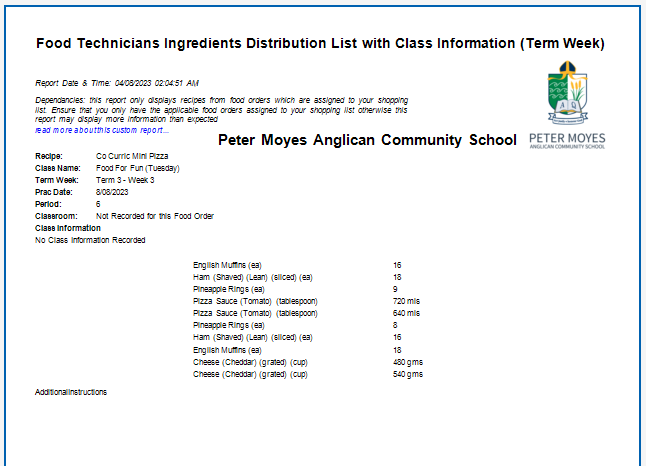
This custom report has been added to assist schools in producing an ingredient distribution list which incorporates class information i.e. allergies etc. This custom report was requested by St James Anglican School (WA) whose food technicians wanted to know if the classes they were distributing ingredients back to had any allergies recorded against them.
Note: this report is also available to schools that use "Week Starting" via the custom reports menu within My Recipe Manager.
The report includes the below information:
-
Recipe Name
-
Class Name
-
Term Week
-
Practical Date
-
Period
-
Classroom
-
Class Information (allergies)
Note: if no class information has been recorded against the class name for this recipe then class information will display "Not Recorded for this Food Order".
Dependences*
The functionality of this report is based on the below:
-
Only food orders that are assigned to your shopping list will appear in this report.
-
If your school is not managing their food orders correctly i.e. deleting old ones, then this report may time out due to the number of food orders your school has created. Most schools maintain a list of 5 to 30 food orders at any one time and only the food orders that are required for purchase are ticked to appear on their shopping list. Once purchased they are unticked from the shopping list and then deleted a week or two later.
-
Allergies or the lack of allergy information within a class should always be verified by a teacher as this report is only an indicator for class information.
General Information and Example Screenshots
By default when the report first opens it will display the recipes from all of your food orders that have been assigned to your shopping list (refer to below image).