How to Delete a Recipe
My Recipe Manager allows you to delete any recipe that you have created however, deleting a recipe cannot be reversed i.e. there is no 'undo'. Deleting a recipe also deletes every ingredient that is assigned to that recipe e.g. if you deleted a curry recipe that had 25 ingredients assigned to it then deleting the recipe will also delete those 25 recipe ingredients.
If you accidently delete a recipe you will need to recreate that recipe then re-assign all of its ingredients to it.
To view the topic on how to delete multiple recipes at the same time please click here.
To delete a single recipe follow the below instructions:
- Select the menu named 'Recipes'.
- Locate the recipe that you wish to delete.
- Hover your mouse over the recipe name and you will see three dots (refer to the image below).

- Select the three dots with your mouse pointer for the recipe that you wish to delete and a menu will pop open (refer below image).
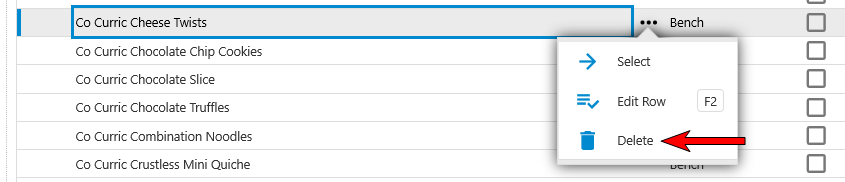
- To delete the recipe select the menu named 'Delete' (refer to the image above).
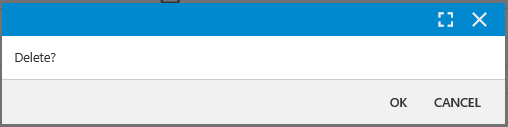
- A confirmation window will open (refer to the image below). To confirm that you want to delete the selected recipe select 'OK' button, to cancel the deletion select the 'Cancel' button.
Deleting a recipe cannot be reversed i.e. there is no 'undo'. If you accidently delete a recipe you will need to recreate that recipe then re-assign all of its ingredients to it.