How to Delete Multiple Recipes
Warning: My Recipe Manager allows you to delete any recipe that you have created however, deleting a recipe cannot be reversed i.e. there is no 'undo'. Deleting a recipe also deletes every ingredient that is assigned to that recipe e.g. if you deleted a curry recipe that had 25 ingredients assigned to it then deleting the recipe will also delete those 25 recipe ingredients.
If you accidently delete a recipe you will need to manually recreate that recipe again then re-assign all of its ingredients to it.
To view the topic on how to delete a single recipe please click here.
To delete multiple recipes at the same time follow the below instructions:
- Select the menu named 'Recipes'.

- When the web page opens:
- Select the small drop down arrow immediately to the right of the recipe numbers.
- If it is not already selected, select the menu titled 'Multi Selection'.
Note: if it is already selected there will be a small tick to the left of the menu the same as the one shown to the left of 'Grid' in the below image.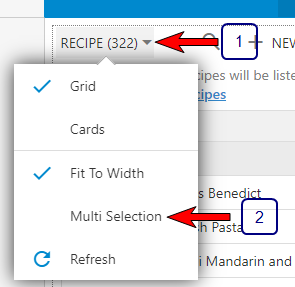
- Once 'Multi Selection' has been enabled (selected) hover your mouse pointer over each recipe name and you will see a small transparent circle to the immediate left of each recipe name (refer to below image).
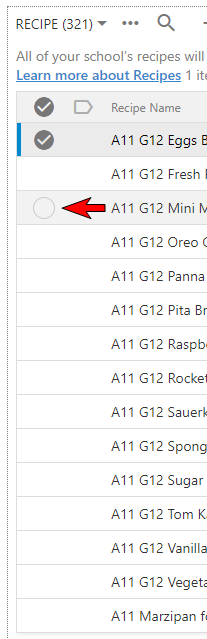
- To delete multiple recipe names at the same time select (tick) the small circle to the immediate left of each recipe name that you wish to delete. In the below example we have selected six recipes.

- To delete the selected recipes select the 'Delete' menu along the top of your recipe names (refer to below image).

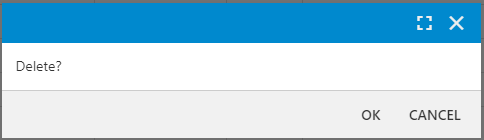
- My Recipe Manager will prompt you to confirm the deletion by opening a confirmation window (refer to below image). To confirm the deletion select the 'OK' button. To cancel the deletion select the 'Cancel' button.
Warning: deleting a recipe or multiple recipes at the same time cannot be reversed i.e. there is no 'undo'. If you accidently delete a recipe or delete multiple recipes you will need to manually recreate each of those recipes then re-assign all of their ingredients to them.
-
To disable 'Multi Selection' and return your recipe list to its normal state i.e. single recipe deletion, untick the 'Multi Selection' menu by selecting it a second time. This will remove the 'tick' to the immediate left of the menu.